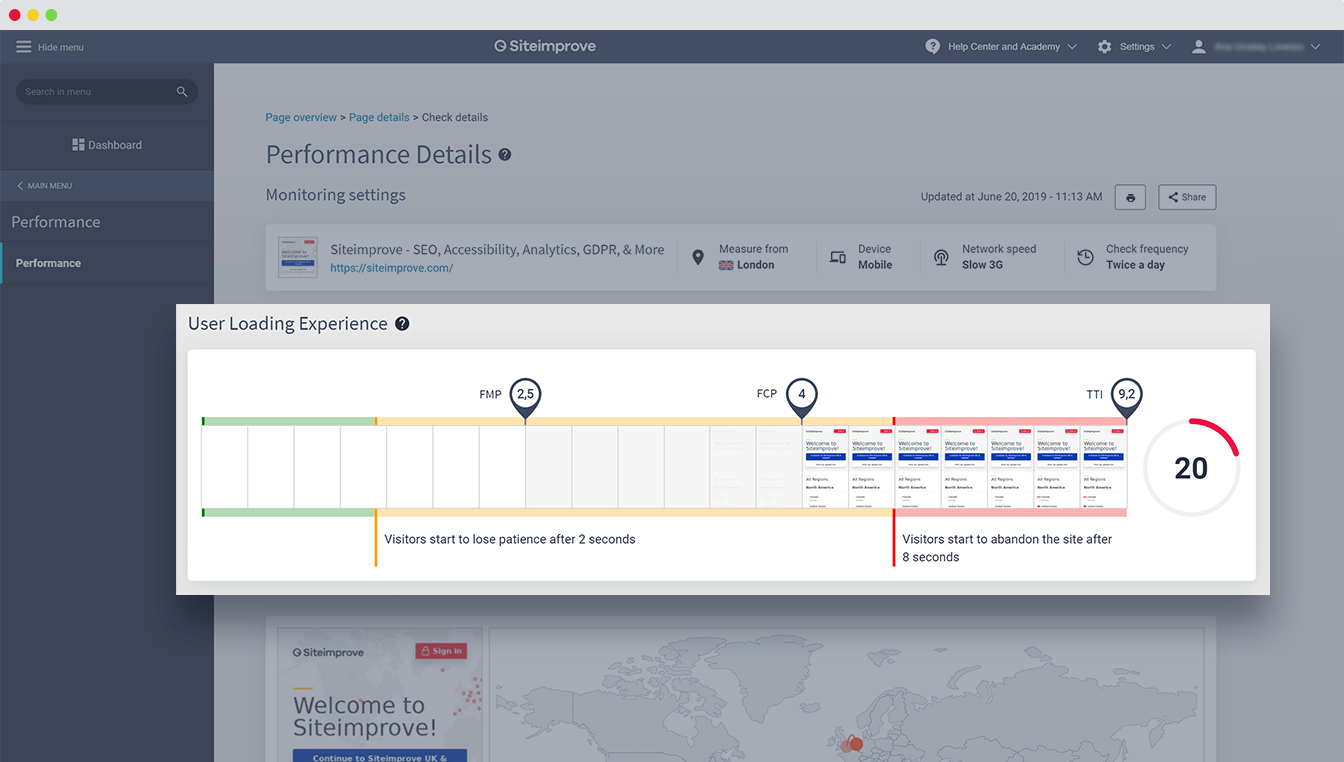
It’s no secret that website speed is the new currency that determines whether your digital strategy will be successful. Google revealed back in 2018 that they use your website’s speed on mobile as a strong search ranking factor, effectively pushing visibility and traffic towards sites that provide the fastest and smoothest mobile experience.
Furthermore, several studies in recent years have revealed that the consumers of today not only expect a consistently fast experience when they’re browsing the web, but also consider the performance of a website a strong determinant for whether or not they’ll recommend the services to friends and colleagues.
In fact, according to recent studies, 66% of online customers said website performance affects their impression of a company, and 33% of these customers have a negative impression of companies with slow websites.

This has huge implications for businesses that leverage the web as part of their overall strategy – regardless of whether you’re selling directly to consumers, promoting your brand, or providing services via digital channels. If your website isn’t fast, it’s going to cost you serious business. If you want some practical tips on how to improve the speed of your website, make sure to check out our article on this.
So, we know that a slow website is hugely problematic, but how fast does your website need to be in order to meet consumer expectations? To answer that, we first need to know what consumer expectations actually are: According to data from Shopify, 47% of consumers expect a page to load within 2 seconds, and 40% of visitors will start to leave a page after waiting for more than 3 seconds. More than half of all mobile customers expect websites to load as quickly on their mobile device as on their computer.

How to measure website speed and experience
In order to determine the website speed you should aim for, you need to first determine how you should measure your website speed. This has changed over the years, as our understanding of the importance of website speed, as well as the tools available for measuring this have improved, allowing us to be more and more precise in terms of determining how fast a site currently is for different users.
A changing landscape for measuring website speed
Back before smartphones were a staple of everyday life (think pre-2009 when the iPhone 3GS came out), measuring website speed and performance was very straightforward and a bit naïve in terms of measurement.
At this time, the metric that mattered was page load time, and improving that was rather straightforward using different waterfall views. Meaning, you could simply remove or rearrange different elements and components on a page to reduce the page load time, thereby increasing your speed.

Nowadays however, smartphones have surpassed desktop in terms of traffic volume, and fundamentally changed our expectations as visitors and users. Today’s web users fundamentally expect websites and e-services to deliver a great experience on their mobile devices. While websites deliver better and better functionality, more focus is put on interactivity and user inputs, as opposed to simply using websites as static information portals.
As these changes have taken place, web professionals and industry experts have taken notice, updating both their understanding of website speed and our terms for explaining and understand what differentiates a fast website experience from a slow one. Nowadays, it’s considered best practice to split up the old page load time metric into sub-categories: visual content and interactivity.
1. Visual content
Visual content refers to the visual information that a user can perceive, with the goal of being to present that information as quickly as possible to the user. Even if the page is not fully loaded, presenting visual content that informs the user about which page they have landed on, which brand they’re interacting with, or which article they’ve clicked on, will help reduce bounce rates and increase the likelihood that the user will stick around for the full page load.
2. Interactivity
Interactivity, meanwhile, measures the time a user has to wait until they can interact with the page, give input to the functionality provided by the page, and achieve what they are trying to do on the page.
For pages that have a clear goal, such as a call-to-action (CTA) element, search field, or different selector features, this becomes very valuable and important, as we want to allow users to achieve what they want as quickly as possible.
Google Lighthouse scoring scale
In order to help us separate high speed pages from low speed pages, we need an effective scale that can give us clarity. Thankfully Google provides us with a very user-friendly scoring scale through their open-source Lighthouse project.
This scoring scale aggregates many of the factors mentioned earlier, namely page load time, visual content, interactivity etc., into one overall score that presents how fast a website is overall. This makes it easy to compare different pages, and to figure out how we stack up against competitors, industry leaders, and other relevant sites.
So, what’s a good website speed and what should I aim for?
Having looked at all these factors, it becomes easier to determine what you should be aiming for, and whether your website is fast enough to capture visitor interest. Research recommends that your website provide visual content within 2 seconds from the user trying to access the site. If possible, the site should be interactive within 5 seconds.

Using Google’s 0-100 scale and the key metrics mentioned earlier, it becomes possible to provide an aggregate view as well. According to Google’s own documentation, a score on their scale of 0-50 is considered poor, 51-90 considered good and 90+ considered great. Once you’ve solved the low-hanging fruits and gained the easy points on this scale, check out our tips on how to further increase your website speed and user experience.

Having said this, most research suggests that when it comes to website speed and finding out how fast is fast enough, faster is better. This continues to scale as you get faster and faster, as metrics like bounce rate, search visibility (SEO), conversion rates, etc. are all positively affected by being faster.
Once you have established an acceptable goal in terms of your website speed, it’s a good idea to continuously monitor this over time and try to maintain a fast experience for your users. Using a performance monitoring tool, like Siteimprove Performance, can help you monitor and track your progress moving forwards, so you can see exactly how your visitors experience a page loading.