
Websites should work for everyone. Not just some people. Everyone.
That's what the European Accessibility Act (EAA) demands: digital spaces that work for all users, including the millions of people in the EU living with a disability. The law isn't difficult to understand because it’s rooted in a simple truth: excluding people with disabilities is unfair and bad for business. These customers buy products, use services, and select "purchase" just like everyone else.
Making sites work for everyone isn't that hard, either, as long as you go about it in a systematic way and make the most of automated testing and tools. Add image descriptions. Fix color contrast. Make sure forms work with keyboard only. Test with screen readers. Small, smart changes add up fast.
That’s great news from a business perspective, too, because good accessibility equals good business: Accessible sites tend to share the clean structure, descriptive text, and semantic markup that help search engines and AI systems understand your content. People stay on your site longer, and the fewer barriers customers encounter, the more likely they are to convert or purchase.
The web must be clear. Laws demand it. Siteimprove finds the problems on your pages, and it helps you fix them so you stay right.
WAD and EAA: The technical standards you need to know
The Web Accessibility Directive (WAD) first showed up in 2016. Government sites had to get accessible. The EAA followed in 2019 and extended accessibility requirements to a defined set of private-sector products and services, including e-commerce, consumer banking, e-books, and electronic communications. Both want websites everyone can use.
Because the EAA is a directive, each EU country enforces it through its own national law, with its own authorities and penalties.
Devs tend to like the standard behind the WAD, EN 301 549. No fluff. Just "do this" clarity. Put alt text on images. Add captions to videos. Make forms work with keyboards. The standard skips the corporate speak and tells you what to build. But there’s still some room for interpretation (e.g., use sufficient contrast), so it’s not all sunshine and rainbows.
You might wonder why all this matters if your business isn't government or public sector. Why should a shoe store or travel site be included? Short answer? If you sell to consumers online in the EU, e-commerce is one of the services the EAA covers. The Act sets its own requirements rather than copying the WAD, though both lean on the same technical standard.
Your team will likely hit some roadblocks as they dig into accessibility. That dropdown menu? Keyboard users can't open it. But don’t reinvent the wheel. Rather, use ready-made accessibility patterns from the World Wide Web Consortium (W3C) rather than build components from scratch. And if you’re relying on third-party tools (like a chat widget) that fail accessibility tests, be sure to ask your vendors for fixes or swap in accessible alternatives.
If you’ve got limited time and resources, prioritize based on where revenue flows in. Fix your checkout first. Then your product pages. Then your account forms. The company history page can likely wait.
Test the easy way first. Try using your site without touching your mouse. Stuck? That's where your users get stuck, too. Then grab a free screen reader and listen to your site. Weird, right? But super effective.
Smart teams build a feature once and use it everywhere.
Make one great accessible button. Use it all over your site. Beats fixing fifty bad buttons any day.
Again, sound accessibility practices pay off. Your code is cleaner. Search engines and AI systems can parse well-structured pages more easily. Users buy more when forms, checkouts, and shopping carts work right.
You might start working toward compliance because the law says you should. But you'll keep going because compliance delivers tangible business results.
Ensure Your Digital Presence is EAA Compliant: Visit our comprehensive EAA Resource Center for essential guides, checklists, and tools to help you navigate compliance and create a more inclusive digital experience.
WCAG made simple
Web Content Accessibility Guidelines (WCAG) might sound intimidating. It's not. It's just a rulebook for making websites work for everyone.
WCAG breaks down into four main ideas: POUR. Perceivable, Operable, Understandable, Robust. Fancy words for "everyone can see your content, use it, comprehend it, and access it with whatever tech they have."
- Perceivable means users know your content exists. Alt text on images. Captions on videos. Good color contrast. No info that only works if you can see or hear perfectly.
- Operable means people can actually use your stuff. Make everything work with a keyboard. Don't use flashy animations that cause seizures. Give users enough time to read and react.
- Understandable means no guessing games. Write clearly. Make navigation consistent. Help users fix mistakes in forms easily. No one should need a manual to use your site.
- Robust means your site works with assistive tech. Screen readers. Voice controls. Zoom tools. Build with standard code that plays nice with these helpers.
Neither law simply says "follow WCAG." The WAD relies on the European standard EN 301 549, which incorporates WCAG 2.1 Level AA for web content. For the EAA, the updated EN 301 549 V4.1.1, published in September 2026, maps the Act's requirements to technical provisions and raises the web baseline to WCAG 2.2 AA. Until it is cited in the Official Journal of the EU, it doesn't yet give a formal presumption of conformity, but it's the clearest signal of where the bar sits.
E-commerce as a use case (welcoming all customers)
Let’s use e-commerce as a concrete example, since nearly everyone shops online, and the EAA has specific expectations for digital storefronts. Your checkout process, product pages, and customer service tools all need to work seamlessly for shoppers with disabilities.
What EAA demands from your online store
The EAA's requirements are functional rather than a checklist, but for an online store they translate into specifics like these: Product descriptions must work with screen readers. Your checkout needs to function with a keyboard only. Filter options must be accessible. Account creation forms need clear error messages.
The law targets core shopping functions. Can users find products? Select options? Add to cart? Pay for orders? Contact support? Every step needs to work for everyone.
Some e-commerce platforms have product galleries that can't be navigated by keyboard. Size selectors that screen readers can't understand. Checkout buttons with poor color contrast. These aren’t just inconveniences — they’re excluded customers and therefore lost sales.
Your e-commerce accessibility checklist
If you’re in e-commerce, start with these must-fix items for your online store:
- Product images need useful alt text. "Red dress" isn't enough. "Women's knee-length red dress with V-neck and short sleeves" tells visually impaired shoppers what they're evaluating.
- Fix your forms. Label every field clearly. Make error messages helpful. "Invalid input" leaves users stuck. "Please enter a valid email with @ symbol" actually helps.
- Make sure keyboard users can shop. Test the whole buying process without a mouse. Many shoppers with motor disabilities rely on keyboard navigation only.
- Review cart and checkout pages twice. These critical conversion points often have the worst accessibility barriers. Test them with both keyboard and screen readers.
- Don't hide info in images. Those size charts as JPGs? Screen readers can't read them. Put that data in real HTML tables or text.
Build accessibility into your e-commerce stack
Smart teams bake digital accessibility into their workflows. It's cheaper and faster than fixing problems later.
Your design system needs accessible components from the start. Create accessible templates for product cards, navigation menus, and form elements. Designers and developers then use these pre-approved pieces to build new pages.
Choose e-commerce tools wisely. Many popular plugins create accessibility nightmares. That slick image zoom feature? Test it with a keyboard before you commit. That reviews widget? Make sure screen readers can access it.
Set up automated testing: tools to catch common accessibility issues during development that can be added to your testing pipeline, so problems never reach your live site. Pair your automated testing with manual testing, too — that’s the surest way to reach full compliance.
And don't forget third-party software and solutions like payment gateways, chat widgets, and analytics scripts. These external tools can break accessibility on your otherwise perfect site. Demand accessibility compliance from your vendors or find alternatives.
The payoff goes beyond EAA compliance. Better accessibility means more sales, period. When shoppers can easily browse products, understand options, and complete purchases, your conversion rates climb.
And sure, accessibility requires attention to detail — at a volume most teams can't keep up with alone, which is where the right tools matter. But it’s the right thing to do, and it directly improves your bottom line.
The EAA is in force: what tech teams should do now
The EAA's obligations have applied since 28 June 2025. If your products or services are in scope, the question is no longer how to hit a deadline. It's how to close the gaps that remain and keep them closed.
Priority actions for tech teams
Focus on what matters most.
First, do a rapid audit. What's broken? What's fixable fast? Where is your biggest accessibility gap?
Next, fix the critical stuff. Target these in order:
- Keyboard navigation on main user flows
- Basic screen reader access to essential functions
- Form accessibility on checkout and sign-up pages
- Alt text on key product images
- Color contrast on buttons and important text
Document what you're doing. Documentation doesn't excuse non-conformance, but it shows authorities where you stand, and the EAA's narrow exceptions for disproportionate burden require a documented assessment.
Hire accessibility experts if you can. Outside help can speed up critical fixes your team doesn't have the bandwidth or expertise for.
Fix the highest-impact barriers first. Progress on critical journeys matters, but a partially accessible service is still non-conforming where the EAA applies.
Build for accessibility's future
EAA won't stand still. Like all regulations, it will evolve. Smart tech teams build flexibility into their accessibility approach.
Don't just meet today's WCAG standards. You’ll need to continue to adapt as requirements evolve. Modular code, clean components, and good documentation make future changes easier.
The standards are already moving. EN 301 549 V4.1.1 raises the web baseline to WCAG 2.2 AA, which adds criteria for focus visibility, target size, dragging movements, and accessible authentication.
And testing for WCAG alone won't be enough. EN 301 549 also covers non-web content such as documents, software, and mobile apps, so build those into your testing scope too.
Use Siteimprove.ai to support EAA compliance
EAA compliance doesn't need to be a nightmare. Siteimprove.ai turns it into something much better: a competitive advantage.
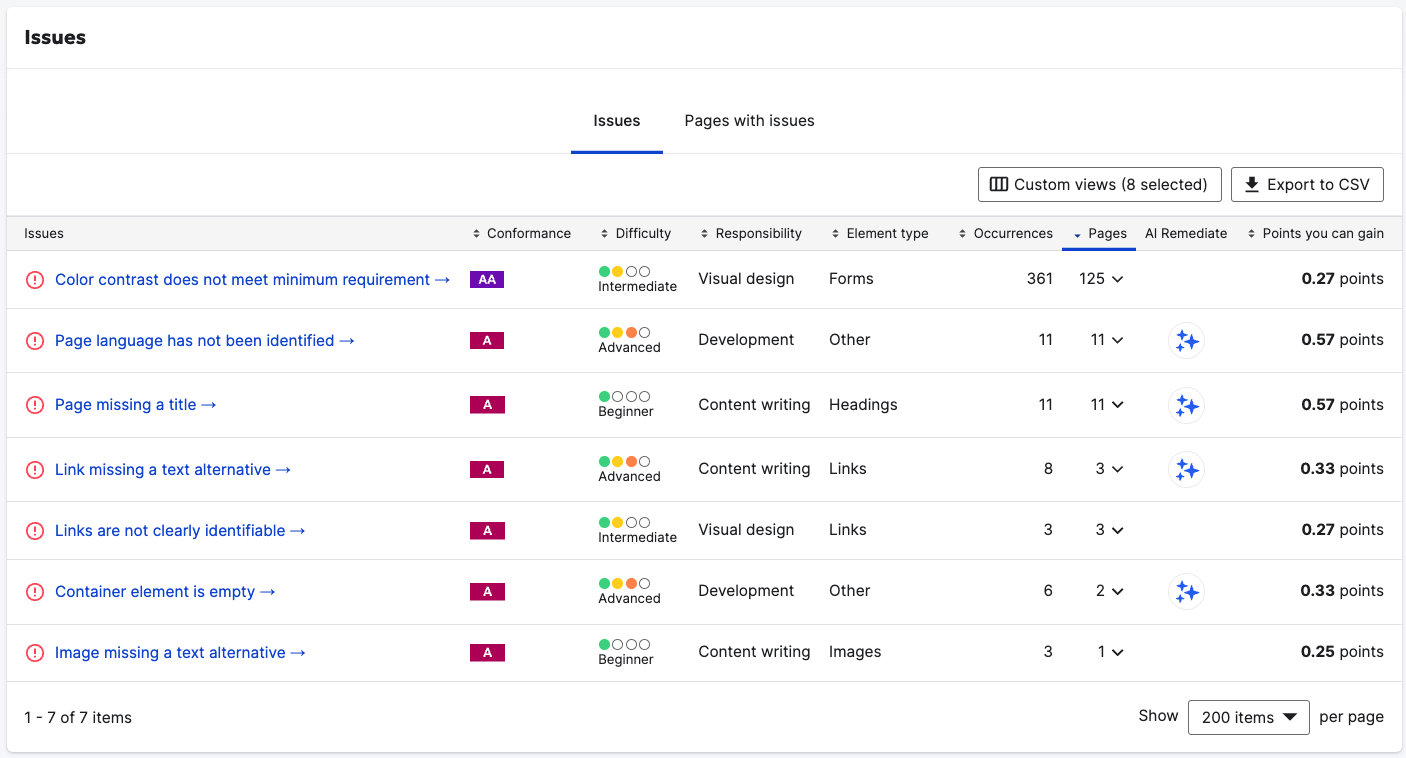
The Accessibility tool in the Siteimprove.ai platform scans thousands of pages automatically, including PDF issues many scanners skip, and gives you a prioritized view of what to fix in minutes rather than weeks. Pair it with manual testing to confirm what automation can't.
The dashboard shows exactly what to fix first. So, no guessing which issues matter most. You see problems ranked by impact and effort required, so your team tackles the right things in the right order.
Development teams love the integrations. Accessibility plugs directly into your existing solutions. Find issues while writing, not after launching. Run tests from your CI/CD pipeline before anything goes live.
Content creators check compliance right from the CMS. No more publishing inaccessible content by accident. The system flags issues before they reach your live site.
What will truly motivate your team? Watching your accessibility score climb. Each fix nudges your score higher. Teams get excited about accessibility when they see visible progress.
At scale, manual testing alone can't keep pace. Accessibility in Siteimprove.ai scans thousands of pages automatically, so your experts can focus on the issues only humans can judge.
Don't just barely comply with EAA. Use Siteimprove.ai to turn web accessibility from a legal headache into a business advantage. Your customers with disabilities will notice the difference . . . and so will your conversion rates.
Accessibility pays big business dividends
Accessibility is about legal compliance. And it's about smart business. Tech teams that embrace accessibility gain advantages that their competitors miss.
What EAA really costs your tech department (and how to reduce it)
Let's talk budget. Accessibility requirements demand investment: time, training, and tools. But smart resource planning makes it manageable.
Early integration saves serious money. Building accessibility from the start costs a fraction of your project budget. Retrofitting later? The costs multiply dramatically. Prevention beats cure every time.
On that note…
Your dev team needs training, not replacement. A few focused workshops can deliver the basics. Online courses fill knowledge gaps. Most developers pick up accessibility principles quickly when they’re taught properly.
Quality assurance teams need minimal retooling. Many accessibility tests use existing QA frameworks. Add screen reader and keyboard testing to your QA checklist. (Better still, pair it with manual testing by accessibility specialists.)
Project timelines shift slightly, not dramatically. Build accessibility checkpoints into your existing sprints. This prevents the "accessibility sprint from hell" right before launch.
Tech wins nobody talks about
Why bother beyond avoiding fines? Clean, semantic code is easier to maintain and often performs better. Accessible sites tend to share the clear structure that helps search engines and AI systems understand your content. Users stay longer when they can use your site.
Your bounce rate drops when people can easily navigate. Conversion rates climb when everyone can complete your forms. Mobile usability improves, too. In other words, accessibility wins = business wins.
Fix these common roadblocks fast
Most companies hit similar obstacles. Here's how to power through them.
"We don't have budget for this." Reframe it. Accessibility isn't a separate project — it's a quality standard like security or performance testing. Build it into existing work.
"Our developers don't know how." Start simple by focusing on the basics: semantic HTML, keyboard navigation, form labels, image alt text. These four fixes address most common issues.
"We use too many third-party tools." Audit your vendors. Ask for their accessibility features and compliance status. Replace the worst offenders. For others, build accessible alternatives for critical functions.
"Our CMS makes it hard." Most modern CMS platforms support accessibility. Check for plug-ins and templates that meet standards. If yours genuinely blocks compliance, document these limitations while planning a migration.
"We can't fix everything at once." Prioritize ruthlessly, focus on revenue-driving journeys, and document a remediation plan. The obligations already apply, so treat the plan as a way to close gaps quickly, not as a substitute for meeting the requirements.
The companies winning at accessibility don't see it as a burden. They recognize it as a technical advantage that happens to help people with disabilities . . . and their own bottom line in the process.
Building truly accessible tech (not just checkboxes)
The EAA isn't just another box to check. It's your chance to build better digital experiences for everyone.
Companies that treat accessibility as a burden miss the bigger picture. Your code gets cleaner. Your content gets easier for search engines and AI systems to understand. Mobile experiences get better. All happy side effects of doing things right.
The difference between struggling with EAA and mastering it? Attitude and tools. Leaders see accessibility as an opportunity, not an obligation.
Start by tackling the basics: keyboard navigation, alt text, form labels, and color contrast. These quick fixes solve most common issues that block users with disabilities.
This content is for informational purposes only and does not constitute legal advice. The EAA is implemented through national laws, and legal obligations vary by country and context. Consult qualified counsel for legal guidance.